

Designing a Campaign Framework That Actually Scales
This post is based on a presentation I gave at the London Marketo User Group in June 2026 and again at our European MOPros Chapter meeting the same month. It generated a lot of conversation both times, so I wanted to write it up properly.
If you have ever run a campaign report with a filter that says “campaign name contains webinar” — this one is for you.
Or if you have had a sales rep come to you three times in one week asking for the link to the webinar recording. Or if your BDR manager has absolutely no visibility into what campaigns are running in their region. Or if your instance contains three different spellings of “cancelled” living as active campaign member statuses.
This is not a failure of tools. It is a failure of structure.
As part of the EMMIE Collective, I worked on a project that started with a deeply messy Marketo and Salesforce setup and ended with a reporting foundation that marketing, sales, and leadership could actually trust. I want to tell you the full story — including the parts that did not go well.
What We Walked Into
The tech stack was solid: Marketo, Salesforce, Iterable, Sequel.io, Splash. The problem was not the tools. It (usually) never is.
What they actually had:
- 74 Marketo channels — many overlapping, plenty of legacy values still active
- 70+ Salesforce campaign types — regional, team-specific, accumulated over years
- 80+ lines of SQL logic holding their dashboards together, manually rewritten every time someone added a new channel
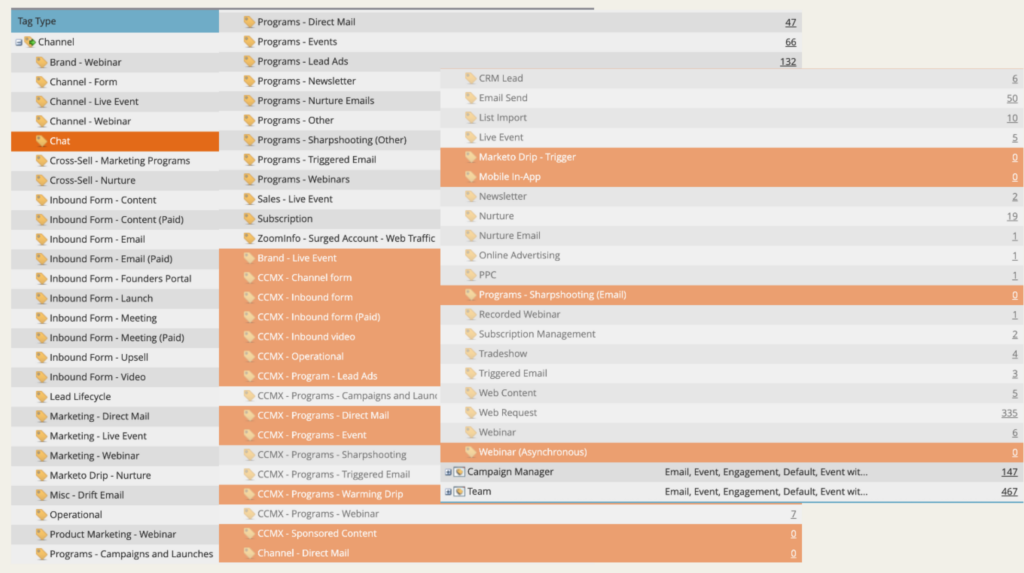
For the webinar tactic alone, they had seven different channel names: Brand – Webinar, Channel – Webinar, Product Marketing – Webinar, Programs – Webinars, Recorded Webinar, Webinar (Asynchronous), Marketing – Webinar. Each created independently. Each tracked separately. No shared definition. And inside those channels, the campaign member statuses were sometimes different too — because each team had set them up the way they wanted.
For events, the picture was the same: Brand – Live Event, Marketing – Live Event, Sales – Live Event, Channel – Live Event, Programs – Events, Live Event, Tradeshow. Seven channel names for one tactic, each owned by a different team, none of them talking to each other.
There was also a Salesforce formula field called Campaign Category — someone’s attempt to group all the webinar channels back together for reporting. It was 80+ lines of conditional SQL logic. Every time a new team created a new channel in Marketo or a new type in Salesforce, the business engineering team had to rewrite it. It frequently broke. Marketing ops did not have their hands on it. Leadership could not answer a basic question: what is driving pipeline? What is running globally?
This is what happens when a system grows without a framework. You end up with accumulated decisions instead of a structure — and a patch job trying to hold everything together.
Building the Business Case From Real Pain
Before I touched a single field or proposed a single change, I went looking for proof that the problem was real.
I spent time going through two years of Slack history for this client, searching for keywords like report link, registration page, date of event, slide deck, recording. I built a Google Sheet of around 50 specific examples — real messages, real people, real gaps. Questions like: Can you send me the link to the upcoming webinar? Where’s the slide deck from last week? Is that report out yet? What’s the date of the event we’re promoting?
These were not complaints about technology. They were evidence that basic information — the kind any sales rep or marketer should be able to find themselves — was not surfaced anywhere. It was living in Slack DMs, in spreadsheets, in someone’s memory.
This became the business case. Not theory. Not a cleanup project for its own sake. Proof that people were suffering, and that something structural underneath was causing it.
Complex dashboards are usually a symptom of a broken foundation. I wanted to show that before I proposed ripping out 75 campaign types.
The Four Principles That Guided Everything
From the very beginning, we committed to four decisions that guided every conversation and every trade-off that followed.
1:1 mapping. One Marketo channel equals one Salesforce campaign type. No exceptions, no special cases, no “but what about this one specific use case.” If you cannot map it 1:1, you have a structure problem — and adding another channel is not the answer.
Simplicity first. We went from 70+ campaign types down to 15. Fewer choices means faster decisions. When you reduce options, people stop debating and start executing.
Data ready from day one. Required fields on campaign creation meant reporting was possible immediately — not after a cleanup sprint three months later when no one can remember what they meant by their field values.
Governed but flexible. We set a tight global standard first, earned the trust of the team, and then extended carefully with subtypes where the business genuinely needed more granularity. Not the other way around.
The Numbers
Here is what we actually changed, and I think they are worth sitting with:
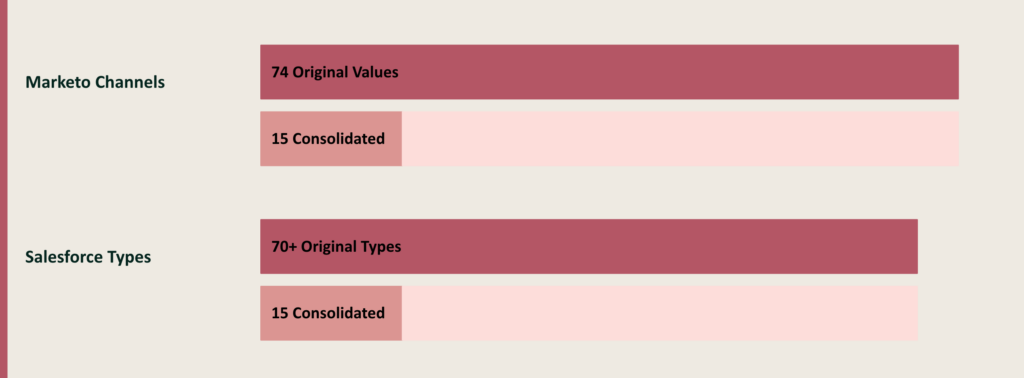
- 70+ Salesforce campaign types → 15
- 74 Marketo channels → 15
- 48 campaign object fields → 43 net (22 removed, 17 new fields added, 7 existing fields repurposed)
- 98 campaign member object fields → 39 (59 removed — a 60% reduction)
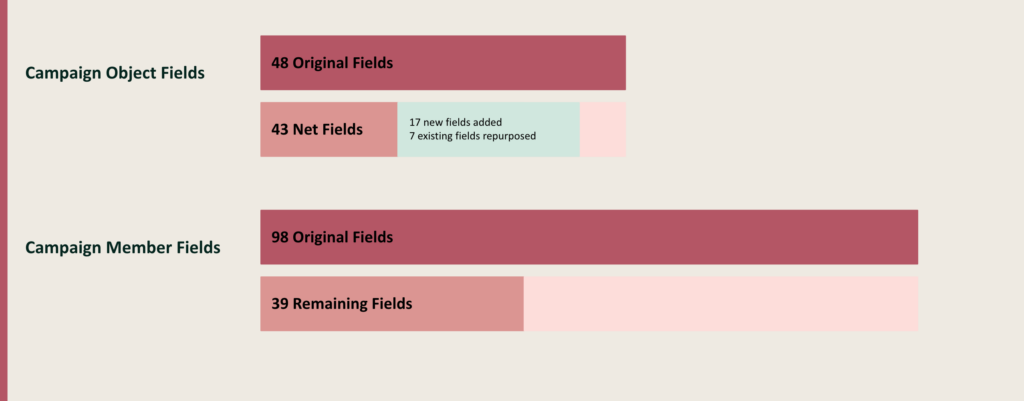
On the campaign member object specifically: 81 fields removed across both objects combined. Every field we removed is one less decision a marketer can get wrong.
More fields does not mean more insight. It means more inconsistency.
We were deliberate about what we removed. Most of the deleted fields were optional fields that had never had any data put in them — sometimes for years. If nobody is filling it in, it is not adding insight. It is just adding noise and adding decisions.
On the repurposed fields: we tried to reuse as many existing fields as possible rather than creating new ones with similar names. There were some cases where we could not — this client had fields like Persona that were global picklists used across Opportunity, Account, and Contact objects in Salesforce — so we created campaign-specific versions for marketing reporting purposes. But as a rule, we subtracted before we added.
What We Built Into the Campaign Object
Every new field had to have a job. No optional fields that might get filled in sometimes. Required fields that create the reporting backbone from the moment a campaign is created.
Here is what we landed on, and why each one earned its place:
Type — the high-level marketing motion, mapped 1:1 to a Marketo channel. Webinar. Event. Content. Chatbot. 15 values, no more.
Sub-type — this was not in the original plan at all. We added it later as regional teams flagged that they genuinely needed more granularity within types. For Content, sub-types included things like eBook, Infographic, Case Study. For Event, sub-types included Lunch & Learn, Executive Meeting, Tradeshow. Sub-type gave us flexibility without reopening the campaign type debate.
Group — which team on the marketing team owns this campaign: Field Marketing, Channel Marketing, Demand Gen, Brand, Marketing Ops, Business Development, Communications. This was mandatory. Just from that one field alone, you can create a Salesforce report or list view that immediately shows you everything Field Marketing is running versus everything Demand Gen is running. No Slack messages required.
Region and Sub-region — these fields were dependent on each other. If Region was EMEA, Sub-region could be DACH, Southern Europe, Northern Europe, or UK & Ireland. If Region was Americas, Sub-region could be East, West, Central, or South. If Region was APAC — and it is worth noting that while we were mid-project, this client added a new APAC regional marketing team, which is exactly why they needed a framework that could grow — Sub-region covered ANZ, Japan, and China. Sub-region was conditionally required based on the region selected.
Start Date and End Date — Start Date was mandatory for every campaign. End Date was mandatory for events (the last day of the event) and had a specific meaning for content campaigns: the date the asset was no longer publicly available.
Business Unit — this client is in financial services and sells multiple products internally called business units. If a campaign was supporting a specific product, it was tagged here. There was a default value of “General” for campaigns that were not product-specific.
Persona — the primary audience for the campaign, from a set picklist. They had a default value at the CFO level, with more specific personas available for campaigns that needed them.
Partner — a lookup field tied to an Account record in Salesforce. This lets you track how many campaigns a specific partner account is supporting, directly on the campaign object. You can also call it Customer or Vendor depending on your model.
Making the Campaign Object Something People Actually Want to Use
Here is the thing about the Salesforce campaign object: it should not just be for marketing ops. It should be the command center that makes everyone’s life easier — marketers, sales reps, BDRs, new joiners, leadership.
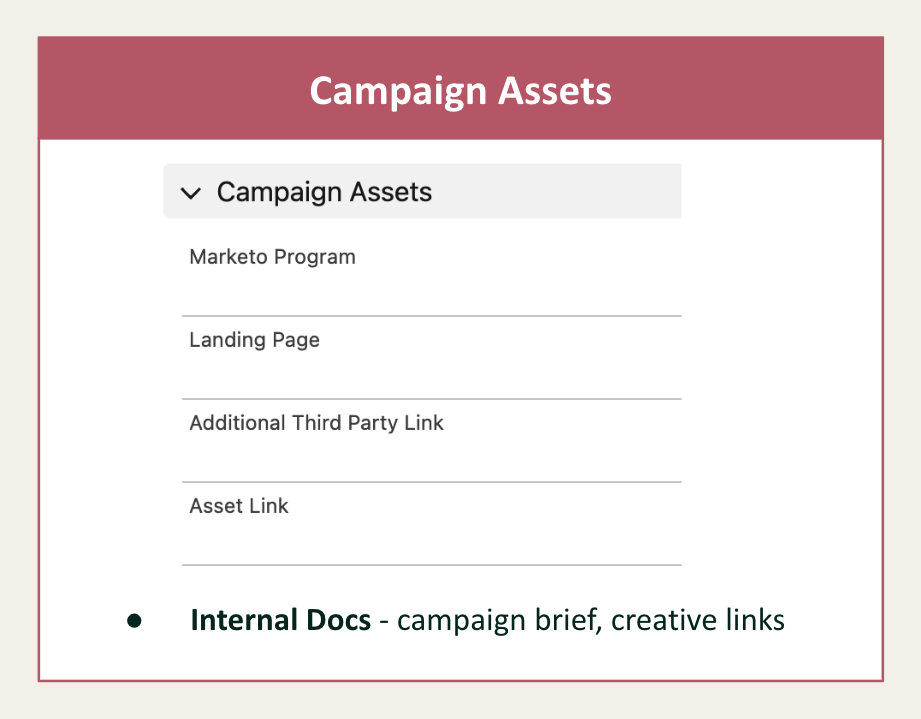
We added a Campaign Assets section to the page layout. Fields for:
- The Marketo program link (so MOps can go directly from Salesforce to make changes, no context switching)
- Landing page URL
- Asset link — the slide deck, recording, or an internal Google Drive or Notion link
- Third-party links — in this case, their Splash and SQL pages for webinars and events
- Internal docs — outreach sequences drafted for sales follow-up, any other links useful to the revenue team
If the data lives on the record, it will not live in your Slack DMs.
Think about every question that gets asked after a campaign: Can you send me the webinar link? Where’s the slide deck from last month’s event? Is this campaign still running? New BDR here — where do I find previous recordings? Every single one of those questions is answered by a field on the campaign object. You do not have to be the person who tracks all of that down anymore. You just point people to Salesforce.
We also added a section for reporting statistics — formula and roll-up fields built into the campaign record itself:
- Engagement Rate — a formula field: number of responses divided by number of campaign members
- Last Member Created Date — a roll-up from campaign members showing when someone was last added to the campaign. This tells you when a campaign is going stale without you having to check
- Number of Net New Records — a count of records acquired through this program (based on a checkbox on the campaign member), rolled up to the campaign level
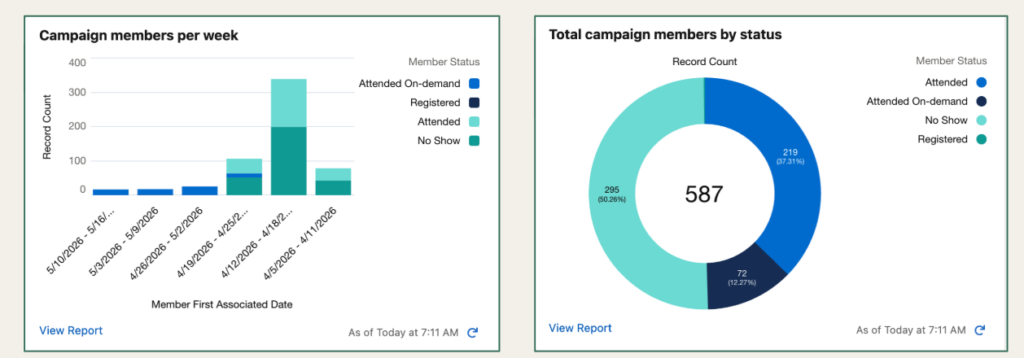
All of this is native Salesforce. No SQL. No custom dashboard. No workaround.
Adding reports to your campaign page layout came to me from a wonderfully written blog post from Jenna Molby.
What Salesforce Became
Before this project, campaign information lived in spreadsheets, in Slack, in people’s heads. Reports required tribal knowledge — you had to know that “cancelled” had two different spellings, that one team used “Watched On Demand” and another used “Attended On Demand.”
After:
- Salesforce became the single source of truth for all campaigns
- Marketers could filter by Type, Region, Group, BU, or Persona in one click
- Sales and BDRs had self-service access to everything they used to ask MOps for
- Leadership could see a real-time global campaign inventory without needing a custom query
- FY and quarter were auto-stamped onto campaign names from the Start Date — no more manual tagging
- Native reporting. No workarounds. No SQL patches.
They even built a campaign calendar natively inside Salesforce based on the fields we created. Because the data now lived on the record consistently, the calendar just worked.
The Process Change That Made It Possible
One of the bigger decisions we made was to change who creates campaigns in Salesforce.
Previously, marketing ops was the gatekeeper — marketers would raise a request, and MOps would create the campaign. We flipped this. We gave marketers direct access to create campaigns in Salesforce themselves, filling in all the required fields as part of their briefing process when they were thinking through a campaign.
When a marketer creates a campaign in Salesforce and fills in all those required fields, that creation automatically triggers the creation of a project in Asana (their project management tool), which alerts MOps to build what is needed in Marketo. The marketer owns the brief. MOps owns the technical build. The handoff is clean and documented from the start.
This was a significant process change, and it came with some friction — more on that below.
How We Got Buy-In
I want to be direct about this: a project this size does not happen without leadership and it does not happen without someone senior who can say no to exceptions.
In our case, that was the VP of Revenue Systems. She was the one struggling to build reliable reporting, and when I showed her what a clean foundation could look like, she was ready. She became the person who walked into conversations with regional teams and closed requests to add exceptions back in.
Without that kind of executive cover, governance does not hold. Governance without authority is just a wish list.
The other things that mattered for buy-in:
- The Slack history made the pain undeniable — real evidence, not theory
- We scoped tightly to an MVP: 15 types, clear deliverables, phased rollout. Trust came from shipping something
- We treated enablement like a product launch: dedicated Slack channel, documentation, office hours, enablement sessions for marketers who had never had Salesforce access before
What Actually Went Wrong at Go-Live
I am a transparent person, and I want to be honest here — because it was not smooth, and I think you will learn more from what went wrong than from the parts that worked.
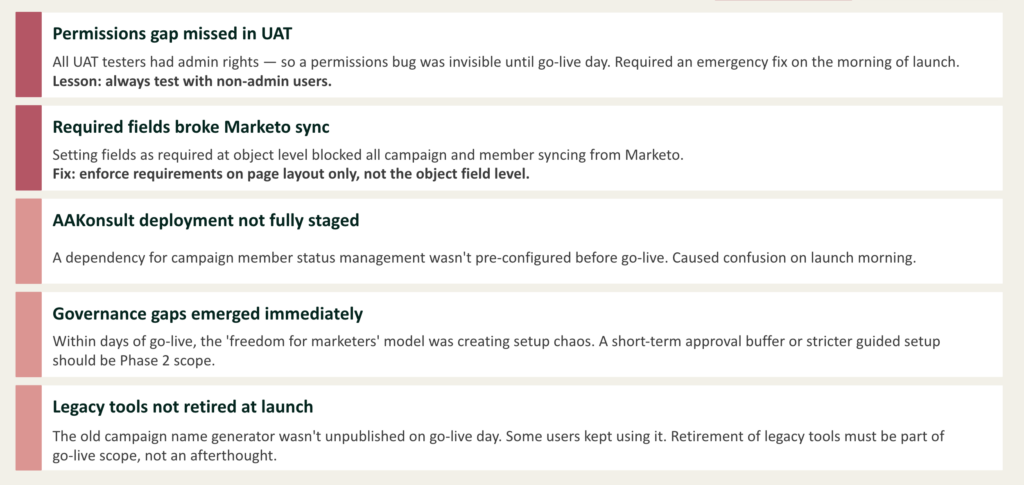
The Marketo sync broke. We made certain fields required at the object level in Salesforce. This meant that when Marketo tried to create a Salesforce campaign through the program sync, it could not populate those required fields — and the sync failed silently. We went live, campaigns stopped being created in Salesforce, and we did not catch it immediately. The fix was to make fields required on the page layout only, not on the object field itself. Marketo can then still create the campaign, and the marketer fills in the required fields when they open the record.
Permissions were never tested with non-admin users. All of our UAT testers had admin access in sandbox. Admins can do anything, so the permissions bug was completely invisible. When we went live, nobody except admins could do anything. We had an emergency fix on the morning of launch. The lesson: always, always test in sandbox with a non-admin user profile.
AAKonsult was not configured in production. We were using AAKonsult — around 180 AUD per year — to automatically assign the correct campaign member statuses based on campaign type when a new Salesforce campaign is created. Because we had moved from “create in Marketo first” to “create in Salesforce first,” we needed a way to pre-populate statuses like Registered, Attended, No Show when a marketer creates a Webinar campaign. AAKonsult does exactly that. It worked perfectly in sandbox. We forgot that it needed to be configured separately in production. Confusion on launch morning.
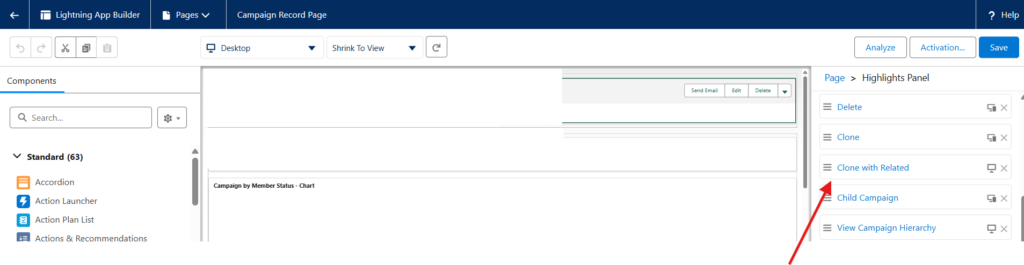
A great tip that came up during the session from Joke Van Essche: Salesforce has a native feature called Clone with Related that lets you create campaign templates with the correct statuses pre-set and clone them. If you do not see it in your instance, it may need to be enabled — it sits in the dropdown arrow next to the Edit button on a campaign record. Worth investigating before you reach for a paid tool.
Marketers created campaigns for everything. When we told the team they had the freedom to create their own campaigns in Salesforce, some of them created a campaign for every individual email send. Within 48 hours we were running coaching sessions on what actually constitutes a campaign.
Here is how we eventually defined it: a campaign is a webinar, an event, a piece of content, a chatbot. An email that promotes your webinar is an email program in Marketo — it correlates to the Salesforce campaign, but it is not a campaign itself. This sounds obvious when you say it out loud. It is not obvious to a marketer who has never had to think about it. We should have run this education session before go-live, not after.
The old naming convention generator was still live. We had built campaign names to auto-populate in Salesforce from the required fields on the record. We forgot to retire the old Google Form naming convention generator the team had been using for years. Marketers kept using the old format as the campaign name — and then the auto-concatenated fields were appending to the end of it. It was a mess.
Retire your legacy tools on go-live day. Not the week after. Not eventually. Day one.
The Community Conversation
Both sessions generated discussion I want to capture here because it adds to the picture.
Andreia Repsold Norsa asked a question I have been thinking about since: could AI automate the audit and setup hygiene assessment process? Not just reporting — but actually identifying what needs to change in the structure, finding the patterns in messy data, and recommending improvements?
Kevin Haase picked up on this and shared something worth knowing. Salesforce went fully headless in April 2026, and there is now a Salesforce MCP (Model Context Protocol) that allows AI tools — Claude, ChatGPT, or others — to connect directly to your Salesforce instance. Kevin had spoken to architects at an Agentforce event in Frankfurt who confirmed: you can give an AI agent a brief and have it assess your campaign object setup, run the audit, suggest changes. The infrastructure is already there for teams willing to experiment.
Mihai Bejgu added a caveat I think is important: “Sometimes when you use AI for this kind of use case, it just turns out to be automating the chaos. The cleanup should be done before you bring AI in — or you need a specially trained agent built specifically for the cleanup.”
My own take: you could probably export all your campaign fields and campaign types, drop them into an AI tool, and ask it to identify patterns in data population and flag inconsistencies. That is a reasonable and low-effort starting point. But the decisions — which 15 types you commit to, which fields become mandatory, how your regions map — those still require someone who knows the business.
AI can surface the problem. Humans have to decide the solution.
Where to Start If You Want to Do This
If any of this resonates, here is the order I would tackle it in:
1. Audit your campaign types. Pull every Salesforce campaign type and every Marketo channel into a spreadsheet side by side. Group the duplicates. You will be surprised how quickly the pattern becomes obvious.
2. Map the 1:1 relationship. For every Marketo channel, identify the single Salesforce campaign type it should map to. Close all the ambiguity before you build anything.
3. Reduce before you optimise. Do not add new fields or types until you have removed the ones nobody uses. Start with subtraction, not addition.
4. Name your required fields. Pick 5–8 fields that must be filled in at the moment of campaign creation. These become your reporting backbone. Keep the list short enough that it does not feel like a form people want to avoid.
5. Get executive cover. You need someone who can say no to exceptions, and who has enough authority for that no to stick. Without this, every team will negotiate their own carve-out until you are back to 75 types.
6. Plan for behaviour change. Training. Documentation. Office hours. A dedicated Slack channel. You are not launching a framework — you are launching a new way of working for a hundred people. Treat it like a product launch, not a technical deployment.
The Takeaway
Simplification is a strategic decision. Not just cleanup. Not just a MOps task. A deliberate choice to build a foundation that marketing, sales, and leadership can actually trust.
Every field you remove is a decision a marketer cannot get wrong. Every campaign type you consolidate is a filter that no longer requires tribal knowledge to run. And when the campaign object becomes the command center, everything else — the reporting, the sales enablement, the exec questions — becomes answerable.
If your dashboards are complex, look at your foundation before you look at your reports.
Want the slides from this session? Or want to talk through whether your campaign setup is ready for this kind of simplification?
This presentation was first delivered at the London Marketo User Group, June 2026, and then at the European MOPros Chapter meeting the same week. Thanks to everyone who contributed to the conversation — Andreia, Kevin, Mihai, Joke, and Morten.