
AI Can Build the Workflow. But Can It Tell You If the Workflow Makes Sense?
What happened when I connected Claude to our event technology and started experimenting with AI as a Marketing Operations teammate.
I recently sat back and watched Claude rebuild an event registration process in Zuddl.
Literally. I sat there watching my screen as it worked through the configuration and built something I would normally have spent hours doing myself.
My first thought was: Well, that’s pretty cool. My second thought was: Wait. Am I even needed anymore?
I’ve been working in Marketing Operations for close to 15 years. I’m a three-time Marketo Champion. I know my way around marketing automation platforms, lifecycle management, and the occasional integration nightmare.
But here’s something you might not expect. I don’t consider myself particularly technical.
I don’t write code. I rely on a developer for my own website and designers to create my visuals. And until recently, I had absolutely no idea what MCP stood for.
Yet here I was, using Claude, connected to our event technology, to build registration flows, configure conference agendas, analyze speaker submissions, and help manage the operations behind MOPZA27 US in Anaheim and MOPZA27 Europe Summit.
I didn’t go off and do something productive while Claude worked. I watched it. I wanted to understand what it was doing, how it was doing it, and whether I could trust the result. Because while AI might be getting pretty good at building things, I’m discovering that knowing what should be built in the first place is a completely different skill.
From asking AI questions to giving it access to my tools
Like many people, I started using AI for relatively straightforward tasks: Writing emails. Brainstorming ideas. Summarizing information. Helping me organize my thoughts. I haven’t written an email subject line myself in months. AI does that for me now.
But recently, my relationship with AI changed.
As part of my work with MarketingOps.com, I’ve been organizing MOPZA27 Europe Summit and supporting registration for MOPZA27 US in Anaheim. Both involve a lot of operational work across multiple platforms. Registration flows, speaker management, email communications, event schedules, audience segmentation, and all the little details that nobody notices until something goes wrong.
And I started experimenting with connecting Claude directly to the tools we were using. This is where MCP comes in.
MCP stands for Model Context Protocol. Essentially, it’s a way for AI applications to connect to external systems and interact with their data and functionality.
The important part is that Claude wasn’t just telling me how to do something in Zuddl or Sessionboard. It could actually help me do it.
And that changed things considerably.
Watching AI build something I would normally build myself
One of my first experiments involved rebuilding the registration process for MOPZA27 US in Zuddl.
We needed to recreate registration forms based on the previous year’s setup, with updated requirements for the upcoming in-person event.
Once Claude had the appropriate access permissions, I could give it the existing configuration, explain what needed to change, and have it work through the process.
It reviewed the previous registration form question by question, then helped recreate the fields in the new registration flows.
Some work could be done through Zuddl’s MCP connection. Other parts required working through the browser because the connector couldn’t edit everything directly.
It added questions about dietary requirements and accessibility needs, then checked the new configuration against the original.
I watched it navigate the interface, work through the fields, and build something that I would normally have configured manually.
It was fascinating. And a little terrifying. Because when you’ve spent years being the person who knows how to configure these systems, watching AI do that work raises some uncomfortable questions.
- What happens when the technical execution is no longer the difficult part?
- What happens when someone who doesn’t know the platform can ask AI to build something inside it?
- And what does that mean for people like me?
Even though Claude was doing the configuration, I was still the person who understood what the registration process needed to accomplish. I knew what information we needed from attendees, which questions mattered, and what needed to happen after someone registered.
I also knew that a registration form isn’t finished just because all the fields exist.
The experience needs to make sense. The data needs to go somewhere useful. And the whole thing needs to work. Nothing went live until I’d reviewed and published it myself.
AI built my conference agenda. Then I had to explain what was missing.
For MOPZA27 Europe Summit, I’ve also been using Claude with Sessionboard, our speaker and session management platform.
I gave it access to our planning spreadsheet and asked it to help build the program structure. It created and configured rooms, session formats, tracks, and scheduled slots.
We’re talking about 17 sessions across breakouts, workshops, and keynotes.
It even identified a time zone configuration issue: the event was set to Athens time rather than Barcelona time. That was a useful catch.
But here’s where things got interesting.
Building an agenda isn’t simply a matter of putting sessions into available rooms.
We have community voting results to consider. We want appropriate regional representation. We want to give new speakers opportunities rather than filling every slot with familiar names. And we need to balance technical, strategic, and soft-skills content.
Claude can create the structure. It can analyze submissions, identify duplicates, categorize topics, and recommend a balanced shortlist.
But its initial work has not fully accounted for all the considerations behind our speaker selection.
It didn’t automatically understand the kind of conference we’re trying to create.
And that’s not a small detail.
MOPZA27 Europe Summit isn’t just a collection of sessions arranged into a schedule. We’re building an event for the European Marketing Operations community.
That means making decisions about whose voices we want to amplify, what subjects our audience needs, and how to create opportunities for people who might not otherwise get on stage.
AI can analyze the data behind those decisions. But it doesn’t know our community the way we do.
A technically complete agenda isn’t necessarily the right agenda.
And I think that’s an important distinction for Marketing Operations more broadly.
Just because something can be automated doesn’t mean we’ve made the right decision about what to automate.
Sometimes AI saves hours. Sometimes it creates more work.
I don’t want this to sound like everything I’ve tried has been a magical productivity breakthrough because it hasn’t.
One example involved the automated speaker emails in Sessionboard. I wanted Claude to help update the existing email templates. Instead, it kept creating new emails, which was not what I wanted.
I spent time trying to get it to work with the existing templates before realizing that I was making the task more complicated than it needed to be. So I changed my approach. I asked Claude to draft the email content, including subject lines, preview text, messaging, and merge fields. Then I went into Sessionboard and updated the templates myself.
Was that the most sophisticated use of AI? Probably not.
Was it faster than continuing to fight with the connector? Absolutely.
And I think there’s a lesson in that.
Sometimes the most efficient way to use AI is to recognize when you should stop asking it to do something.
I’ve also encountered limitations where the connections simply couldn’t perform certain actions.
Some Sessionboard fields couldn’t be configured directly through the connector. Certain changes still required manual intervention. In those situations, Claude could help identify what was missing and give me a checklist to finish the work.
That’s still useful. But it’s not the same as completing the task.
And I think we need to be careful about confusing the two.
The HubSpot project: AI helped me solve a problem in a platform I’d never used
Some of the biggest time savings haven’t come from watching AI configure things. They’ve come from the less glamorous parts of Marketing Operations: data cleaning, for example.
I was working with a HubSpot instance containing approximately 46,000 contacts. And there was a problem. The Country property was a free-text field.
If you’ve worked in Marketing Operations long enough, you probably know where this is going.
Free-text fields and consistent data don’t exactly go hand in hand.
We needed to understand the geographic distribution of our audience, particularly across Europe, but the existing country data wasn’t standardized.
I had two things to figure out.
- First, how to clean up the country values so they were consistent.
- Second, how to categorize those countries into geographic regions we could actually use for segmentation.
I already knew which regions I wanted. But I needed to determine how the existing country values should map to those regions, including some entries that required assumptions or interpretation.
AI helped me work through the country normalization and regional mapping.
Then came the implementation.
I created a new HubSpot property called Geo Region.
The goal was to build a workflow that would populate Geo Region based on the value in the existing Country property.
And here’s where things got interesting.
I’d never worked in HubSpot before. After years of Marketo, I was suddenly learning an entirely different marketing automation platform. HubSpot Breeze helped me build the workflows.
I still needed to define the logic, review the mappings, and make sure the workflow was doing what we intended. But I didn’t have to figure out every configuration step from scratch.
And that saved me hours of manual work.
What I find particularly interesting about this example is that AI didn’t decide what our geographic segmentation strategy should be.
I knew the regions we needed. AI helped me figure out how to implement the logic in a system I was still learning.
That’s a distinction I keep coming back to.
How I’m actually working with AI
I should probably explain something here: I don’t have an elaborate AI methodology. I’m figuring this out as I go.
And I’m almost certain there are people reading this who could tell me ten better ways to do everything I’ve just described. That’s fine.
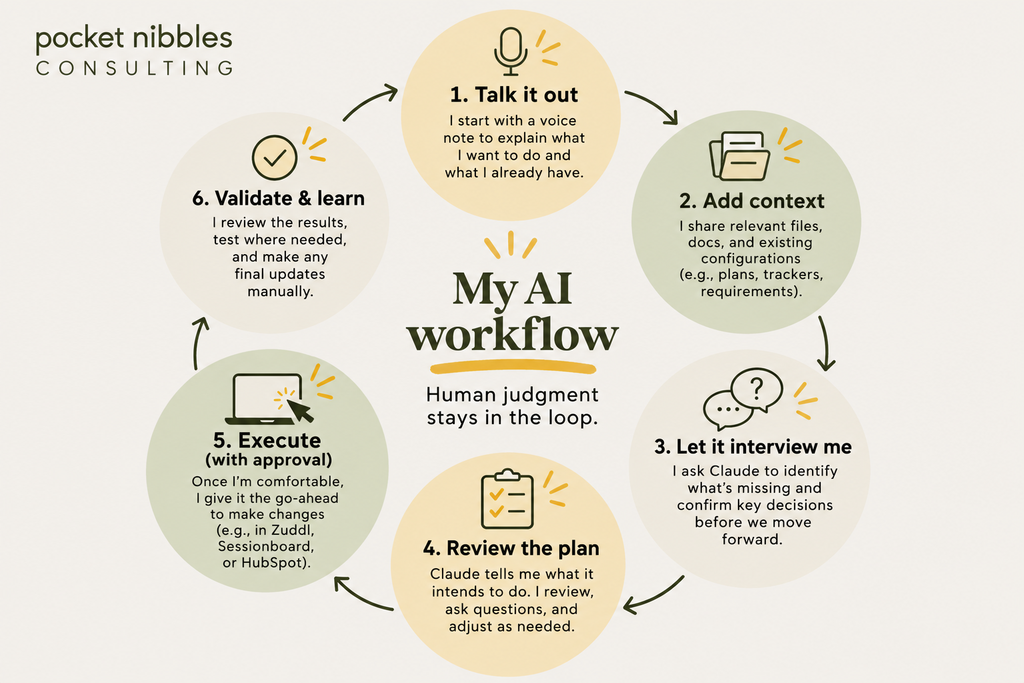
But I have developed a process that helps me feel more comfortable giving AI access to the systems I’m responsible for.
First, I talk to it. I often start with a voice note explaining what I’m trying to accomplish, what already exists, and what I think needs to happen. It’s much easier for me to explain a problem out loud than to write a perfectly structured prompt.
Then I give it context. That might mean sharing planning spreadsheets, documentation, existing configurations, or project instructions. I want it to understand the environment before it starts proposing solutions.
Then I ask it to interview me. This is probably one of my favorite ways to work with AI. Instead of assuming I’ve given it everything it needs, I ask Claude to identify what’s missing.
- What haven’t I considered?
- What decisions still need to be made?
- What information does it need before proceeding?
It’s surprisingly helpful, particularly when I’m working on something complicated.
Then I make it explain the plan. This is my non-negotiable rule. Before making changes in a connected system, Claude needs to tell me what it intends to do.
I review the plan. I ask questions. I correct assumptions. And only then do I authorize it to proceed. Because I’m still not entirely comfortable with the idea of AI making changes inside operational systems.
And frankly, I think a little hesitation is healthy.
Finally, I review the results. Sometimes that means checking configurations. Sometimes it means testing the registration experience. Sometimes it means comparing the output against the original requirements. And sometimes it means accepting that the AI couldn’t do what I wanted and finishing the task manually.
It’s not a perfect process. But it gives me enough control to keep experimenting.
A note about data privacy
One important distinction: I have not imported contact lists or other personally identifiable information into AI tools. I’ve only provided first names where needed.
For the HubSpot work, I used AI to help with the country values, normalization rules, and regional mapping, rather than uploading a database of individual contacts.
Connecting AI to operational platforms also introduces a separate set of considerations around permissions and data access.
That’s another reason I want to understand what a tool is planning to do before allowing it to make changes.
I don’t claim to have every answer when it comes to AI governance, but I believe being deliberate about what information we share and what systems we connect is essential.
Marketing Operations is becoming more technical. And I’m not sure how I feel about that.
There’s another part of this experience that I’ve been thinking about.
Marketing Operations has always required a mix of technical skills, business understanding, and the ability to translate between different teams.
But lately, it feels like the technical expectations are accelerating. We’re increasingly expected to understand AI. To know how to work with APIs and integrations. To build skills, write scripts, or at least understand enough code to troubleshoot something when it breaks.
And that’s a little intimidating.
I know Marketo extremely well. I understand lifecycle architecture, data management, campaign operations, and how systems need to work together.
But I still rely on developers for things that require actual coding.
I’m not someone who builds websites. I don’t design my own graphics. And I certainly didn’t become a Marketing Operations professional because I wanted to be a software engineer.
Yet here I am, connecting AI to platforms through something called MCP and watching it configure systems on my behalf.
Sometimes I wonder whether we’re making Marketing Operations more technical, more scientific, and less of an art. The execution certainly feels that way.
AI can generate code, configure workflows, clean data, and handle tasks that previously required a lot of manual effort. But the more I experiment, the more I realize that the judgment behind those tasks hasn’t disappeared.
If anything, it matters more.
Knowing how to create a workflow is one thing.
Knowing whether that workflow should exist is another.
Knowing how to build a registration form is useful.
Understanding the attendee journey is more important.
And being able to generate a conference agenda is impressive.
But deciding which speakers belong on stage requires an understanding of the people you’re bringing together.
Those are the parts of Marketing Operations I don’t think we should lose.
So, am I still needed?
When I watched Claude rebuild that registration form, I genuinely wondered. If AI can do this, what am I supposed to be doing? I’m still working through that question.
I don’t think AI is going to eliminate the need for experienced Marketing Operations professionals.
But I do think it’s changing what our experience is worth.
Maybe we’ll spend less time manually configuring systems and more time deciding how those systems should work.
Maybe we’ll need to become more comfortable with tools and technologies that weren’t part of our jobs a few years ago.
And maybe some of the things we’ve always considered technical expertise will become easier for other people to do.
I don’t know exactly where this is going.
I’m still hesitant about AI. I don’t always understand what it’s doing behind the scenes. I still have to look up what MCP stands for. And I’m sure I’m not using it as efficiently as I could.
But I’m experimenting. I’m learning. And I’m finding ways to make it useful without handing over the decisions that I believe still need a human behind them.
For now, I’m not trying to become an AI expert overnight. I’m just trying to get a little better at working with it. One workflow at a time.
And yes, I’m probably still going to sit there watching it build things.
At least until I understand a little more about what it’s doing.